Third Party Application Call Control
Pivot Feature
QVOICE Platform Pivot feature allows one to succeed the control of the incoming call to a 3rd party application.
The 3rd party application will have full control of the call, it can play media, collect information using DTMF and transfer calls to other callflows, queues, mailboxes etc.
- Create a callflow in SmartPBX, by navigating to Apps → Callflows → Create Callflow
- Set the pivot action as the child in a callflow
- Set the URL to your web server and script
 |
 |
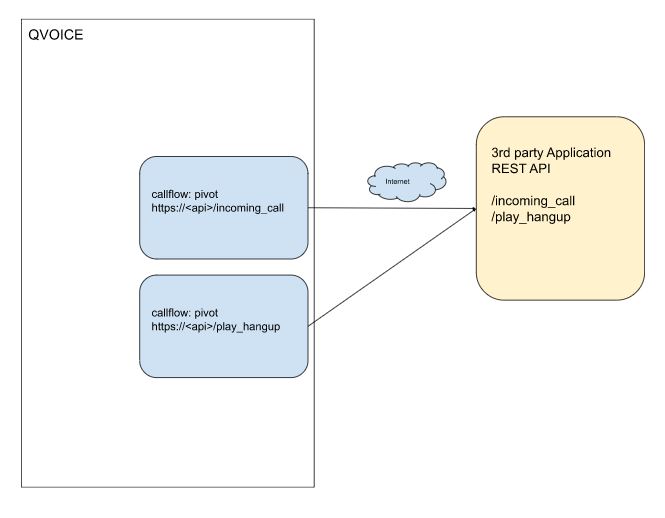
Example of Pivot callflow interactions with 3rd party apps
Incoming call into the platform, either from external (PSTN) side or internal (Registered) side triggers a callflow, by dialing an extension or a E164 number.
The Pivot callflow will execute a REST API call to a 3rd party application and will provide all the call information needed for the 3rd party app to make a routing decision.
The 3rd party app returns callflow JSON objects back to the platform in order to direct the platform to execute the next action.
 |
 |
    #cfid variable is set to a callflow id.
    def pivot_respond_with_callflow(self, acc, cfid):

        cmd={}

        cmd['module']="callflow"
        cmd['data']={}
        cmd['data']['id']=cfid
        cmd['children']={}

        r = app.response_class(
            status=200,
            mimetype='application/json',
            response=json.dumps(cmd)
            )

        return r
    def pivot_respond_with_play_and_hangup(self):
        cmd={}
        cmd['module']="play"
        cmd['data'] = {}
        cmd['data']['id']= http_url+':'+str(cluster_port)+"/play/cf-unauthorized_call.wav"
        cmd["children"]={}
        cmd['children']['_']={}
        cmd['children']['_']['module']='hangup'
        cmd['children']['_']['children']={}


        logger.debug("{} Sending unauthorized  and hangup \n {}". format(self.uuid, json.dumps(cmd, indent=2)))


        r = app.response_class(
            status=200,
            mimetype='application/json',
            response=json.dumps(cmd)
            )
        return r